How to Set Up IPTV on Smart TV (Samsung & LG) / Amazon Fire Stick
Set Up IPTV on Smart TV
If you’re wondering how to set up IPTV on Smart TV, you’re in the right place. Whether you own a Samsung, LG, or Amazon Fire Stick, this guide walks you through each step like I’m sitting right beside you.
The best part? Setup takes less time than assembling IKEA furniture.
What You’ll Need Before Starting
Before diving in, gather these essentials:
- A stable internet connection (at least 10 Mbps for HD streaming)
- Your Smart TV or Fire Stick
- An active IPTV subscription with login credentials
- Five minutes of patience
That’s it. No technical degree required.
Fast Tutorial for Setup IPTV on Smart TV
Step 1: Download The IPTV Smarters App From Your TV Store
(LG, Samsung & Others)
Step 2: After Downloading The App, Open It
Key In Your Login Details.
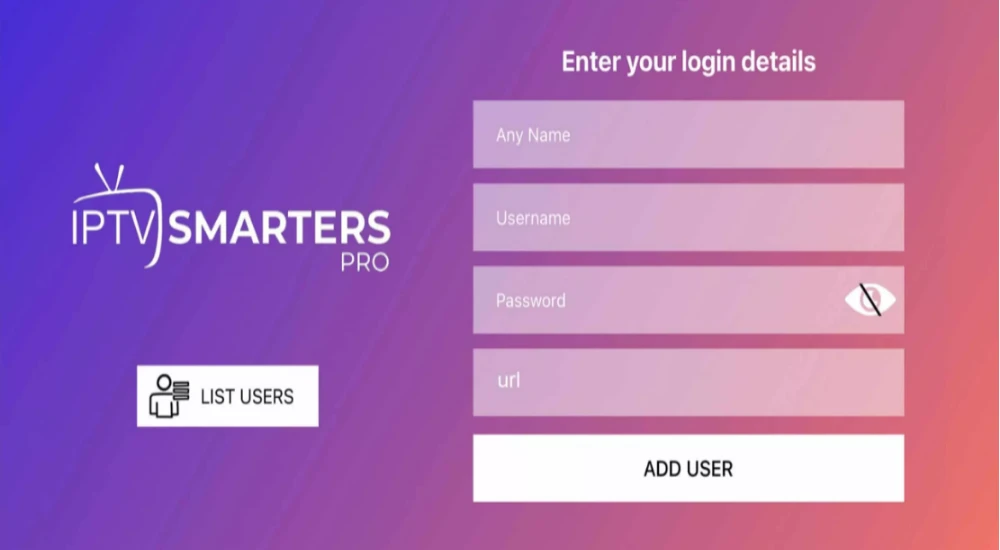
Step 3: Enter The Login Details That You Got After Subscribing
With Us And Then Click On ADD USER To Go To The Next Part.
Step 4: Wait For A Few Seconds.
Step 5: Click Live TV Icon As Shown In The Image Below Using The Red Arrow.
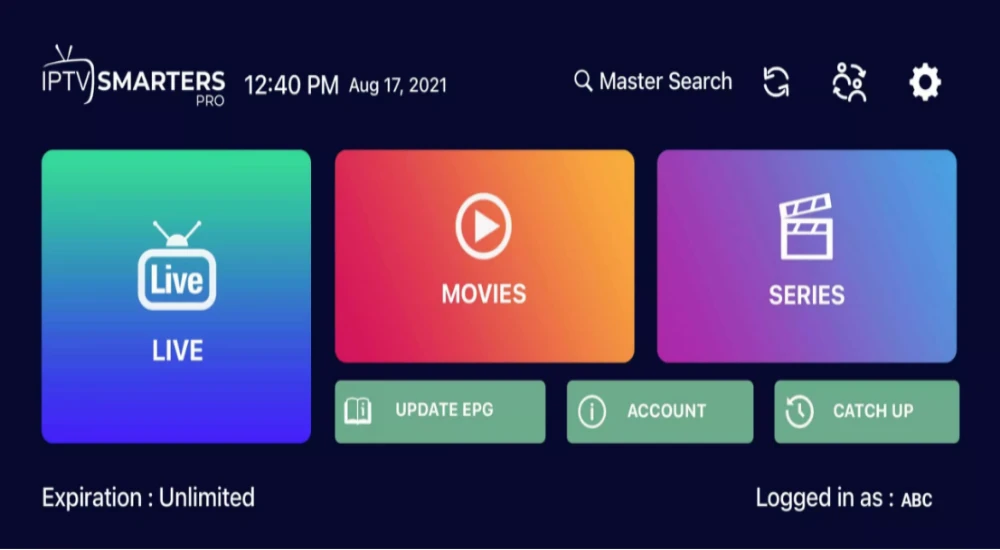
Step 6: Choose The Channel Group You Would Love To Watch
And Go To The Next Section.
Step 7: At This Point, Click On The Name Of The Channel
And Double Click On The Small Screen To Go In To Full Screen As The Last Step.
Step 8: There Is No Need Of Adding Any EPG URL.
Simply Click On Install EPG And You Are Done
Complete Guide to Install IPTV on Smart TV
Install Smarter IPTV on Samsung TV
Samsung TVs running Tizen OS make IPTV setup surprisingly straightforward.
Step 1: Open the Samsung App Store
Press the Home button on your remote. Navigate to the Apps section and search for “Smart IPTV” or your IPTV provider’s app.
Step 2: Download and Install
Select the app and click Install. The download takes about 30 seconds depending on your connection.
Step 3: Launch and Activate
Open the app once installed. You’ll see a MAC address displayed on screen. Head to your IPTV provider’s activation page, enter this MAC address along with your subscription details, and you’re connected.
Most providers send a confirmation email within minutes. Refresh the app, and your channels load instantly.
Install Smarter IPTV on LG TV
LG TVs use webOS, which has a slightly different process but remains simple.
Step 1: Access the LG Content Store
Press the Home button and open the LG Content Store. Type “Smart IPTV” or your specific IPTV app in the search bar.
Step 2: Install and Configure
Download the app, then launch it. Similar to Samsung, you’ll receive a MAC address. Register it on your provider’s website using your subscription credentials.
Some LG models require a small one-time activation fee for Smart IPTV (around $6). This is separate from your streaming subscription but unlocks unlimited use.
Step 3: Load Your Playlist
Once activated, the app loads your channel list automatically. Scroll through categories like sports, movies, and international content.
Set Up IPTV on Firestick
The Fire Stick approach differs because Amazon’s ecosystem doesn’t always include IPTV apps directly in their store.
Step 1: Enable Apps From Unknown Sources
Go to Settings, then My Fire TV, and select Developer Options. Toggle “Apps from Unknown Sources” to ON. This lets you install iptv apps outside Amazon’s official store.
Step 2: Install Downloader App
Return to the Fire Stick home screen. Search for “Downloader” in the Amazon App Store and install it. This free tool helps you fetch IPTV applications.
Step 3: Download Your IPTV App
Open Downloader and enter the URL your IPTV provider gave you (or search for apps like IPTV Smarters Pro). The app downloads in seconds.
Step 4: Install Smart IPTV on Firestick
Once downloaded, click Install. Open the app, enter your subscription login, and you’re streaming.
The entire process takes about five minutes, even for first-timers.
Troubleshooting Common Setup Issues
Technology isn’t always smooth sailing. Here are quick fixes for typical problems:
App Won’t Install
Check your internet connection first. Restart your device and try again. If using Fire Stick, confirm “Unknown Sources” is enabled.
Buffering or Freezing
This usually means your internet speed isn’t keeping up. Close background apps, move your router closer, or upgrade your plan if you’re consistently below 10 Mbps.
Channels Not Loading
Double-check your MAC address registration. Log into your provider’s portal and verify the MAC matches what’s displayed in your app.
Most IPTV providers offer 24/7 support through chat or email. Don’t hesitate to reach out if you’re stuck.
Choosing the Right IPTV Subscription
Not all services are created equal. When shopping for an iptv subscription, look for:
- Channel variety that matches your interests
- Reliable uptime (at least 99%)
- Multiple device support
- EPG (Electronic Program Guide) for easy navigation
- Responsive customer service
Free trials help you test quality before committing. Most reputable providers offer 24-48 hour trials.
Making the Most of Your Setup
Once everything’s running, explore your IPTV app’s features. Many include catch-up TV, recording capabilities, and parental controls.
Create favorite channel lists for quick access. Organize by genre or family member. My household has separate profiles for kids, sports fans, and movie lovers.
Update your app regularly. Providers push improvements and security patches that keep streaming smooth.
Final Thoughts on Installing IPTV
Setting up IPTV on Smart TV doesn’t require technical wizardry. Whether you’re working with Samsung, LG, or Fire Stick, the process is designed for everyday users.
Sarah’s been cord-free for months now and hasn’t looked back. She watches her favorite shows, international news, and live events without the cable company headaches.
Your setup journey starts with choosing a quality subscription and following the steps above. Within minutes, you’ll wonder why you didn’t switch sooner.